
Secure Steam-Tradelink Encryption for YouTube Comments
Overview
YT-Encrypt is a browser extension designed to enhance privacy for users participating in giveaways hosted by the content creator Sparkles on YouTube. The software allows users to encrypt their Steam tradelinks directly within the YouTube comment section, ensuring that only authorized recipients—specifically Sparkles—can access the information. This feature aims to prevent unauthorized access by bots, scammers, or malicious actors who might otherwise harvest tradelinks for fraudulent purposes.
Primarily intended for fans and participants in online giveaways, YT-Encrypt offers a simple yet effective layer of protection for sensitive Steam account data. By encrypting the tradelink using RSA-OAEP encryption, the tool ensures that even if the comment is publicly visible, the underlying information remains secure. The extension is optional, meaning users can still join giveaways without encryption if they choose to share their tradelink in plain text.
Real-world usage scenarios include participating in high-profile giveaways where tradelink exposure poses a risk, or for users who frequently engage with community-driven content on YouTube. The extension is built specifically for the Sparkles YouTube channel ecosystem and does not support other content creators or platforms. The developer did not provide additional information about their background or affiliations.
Key Features & Capabilities
- Real-time Encryption in YouTube Comments – Users can encrypt their Steam tradelinks directly within the YouTube comment box using RSA-OAEP encryption, ensuring secure transmission.
- Optional Integration – The extension is not mandatory; users can still participate in giveaways without encryption by posting unencrypted tradelinks.
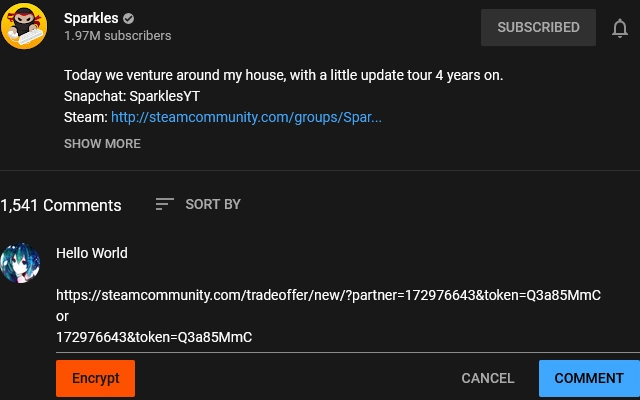
- One-Click Encrypt Button – A dedicated “Encrypt” button appears when opening the comment box on Sparkles’ videos, streamlining the process of securing tradelinks.
- Secure Data Handling – The encryption process occurs locally in the browser, with no data transmitted to external servers, preserving user privacy.
- Compatibility with Sparkles’ Giveaway Ecosystem – Designed specifically for use with the Sparkles YouTube channel, ensuring seamless integration with their giveaway workflow.
For example, a user participating in a Sparkles giveaway can paste their Steam tradelink into the comment box, click the “Encrypt” button, and the extension will convert it into a secure, unreadable format. Only Sparkles, who holds the corresponding decryption key, can decode the information. This reduces the risk of tradelink theft and unauthorized access. The extension does not alter YouTube’s core functionality but operates as a privacy-focused add-on.
User Interface, Workflow & Performance
The user interface of YT-Encrypt is minimal and integrated directly into the YouTube comment section. When a user opens the comment box on a Sparkles video, a visible “Encrypt” button appears, indicating the extension’s active state. The design is consistent with standard Chrome extension UI patterns, focusing on clarity and ease of use.
Navigating the workflow is straightforward: users paste their Steam tradelink into the comment field, click the “Encrypt” button, and the extension processes the input. No additional configuration or settings are required, making it accessible even for non-technical users. The encryption process is instantaneous, with no noticeable delay during typical use.
The developer did not specify resource usage details. Performance observations are based on general software behavior patterns. The extension operates within the browser environment and does not appear to impact page load times or overall browser stability. Known issues include the occasional failure of the “Encrypt” button to appear, which can be resolved by refreshing the page. No reports of crashes or memory leaks were noted.
Compatibility & System Requirements
YT-Encrypt is compatible with Windows, Mac, and Linux operating systems, ensuring broad accessibility across desktop platforms. It functions as a Chrome extension, requiring the Google Chrome browser to operate. The installation size is 1.5 MB, which is minimal and unlikely to affect system performance.
Exact system requirements were not listed. The extension does not appear to require specific hardware configurations beyond standard web browsing capabilities. The developer did not provide information on minimum CPU, RAM, or disk space requirements. Platform compatibility information is limited to the supported operating systems and browser.
Pros and Cons
Pros
- Provides strong privacy protection for Steam tradelinks during YouTube giveaways
- Uses industry-standard RSA-OAEP encryption for secure data handling
- Simple, one-click integration with YouTube comment section
- Optional use allows flexibility for users who prefer unencrypted links
- Lightweight at 1.5 MB with no reported performance impact
Cons
- Only works with Sparkles’ YouTube videos, limiting broader applicability
- “Encrypt” button may not appear consistently, requiring page refresh
- No official support for other content creators or platforms
- Requires Google Chrome to function, excluding other browsers
- Developer background and affiliations not disclosed
FAQ Section
Is YT-Encrypt compatible with browsers other than Chrome?
Currently, the extension is designed to work exclusively with Google Chrome. No support is available for other browsers such as Firefox, Edge, or Safari.
Does the extension collect or transmit my Steam tradelink?
No. The encryption process occurs entirely within your browser. Your Steam tradelink is not sent to any external server or third party.
Can I use this extension for giveaways on channels other than Sparkles?
Not at this time. The extension is specifically built for use with Sparkles’ YouTube videos and does not support giveaways on other channels.
Is the extension free to use?
Yes, YT-Encrypt is completely free and does not require any payment or subscription.
How often are updates released?
Updates are released as needed, primarily to address bugs such as the missing “Encrypt” button. The developer has not specified a regular update schedule.
Final Thoughts
YT-Encrypt delivers a focused, privacy-first solution tailored to the needs of Sparkles’ audience. Its ability to encrypt Steam tradelinks using RSA-OAEP encryption directly in the YouTube comment section is a significant step forward in protecting users from scams and bot harvesting. While the extension is limited in scope—restricted to a single content creator and browser—it excels in its niche.
For fans of Sparkles who frequently participate in giveaways, this tool offers peace of mind and an added layer of security. The optional nature of encryption, combined with a clean interface and minimal resource usage, makes it a practical addition to any participant’s toolkit. Despite minor usability hiccups like the intermittent button visibility, the overall experience remains reliable.
Download YT-Encrypt now







